Ubuntu : Firing it up in the Virtual Box

I am excited to continue my learning journey in DevOps. I believe that DevOps is the future of software development, and I am excited to be a part of the movement.
What is Ubuntu?
Ubuntu is known for its user-friendly interface, robust security features, and large software repository, making it a popular choice for both personal and professional use. The operating system is developed by Canonical Ltd. and is released twice a year with new features and security updates.
Ubuntu is a free and open-source operating system based on the Debian Linux distribution. It is widely used as a desktop operating system as well as for servers and cloud computing.
Guide to be followed to install Ubuntu on your Virtual Machine
Requirements
Storage space 120 GB (Minimum)
8GB of RAM(Minimum)
Virtual Box machine
Installing ubuntu desktop
Download an Ubuntu Image
Download the Ubuntu 22.04.1 LTS from the following link
Download and Install Virtual Box
Install it from the following link
Create a new Virtual Machine on Virtual Box
Click New to create a new virtual machine

Now add the following fields,
Name: Ubuntu
Machine Folder: Where your ubuntu VM will be stored
ISO Image: Select the Ubuntu Image from the Download folder
(with .iso extension)
As shown below

- Create a user profile under the Unattended install
For an uninterrupted first boot, we need to configure the username and password
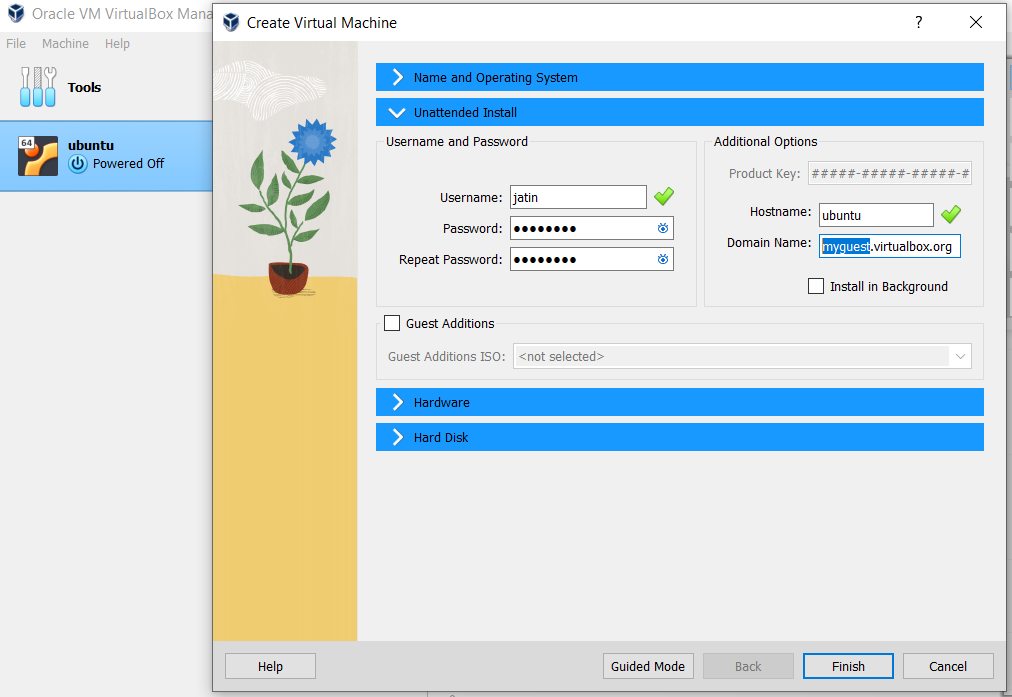
Allocate RAM under Hardware

Allocate Storage under Hard Disk

Click Finish and Start the Ubuntu VM.
Now choose "Try and Install" on the first Boot up.
Follow the on-screen instructions to complete the Ubuntu installation process.
Once the installation is complete, restart the virtual machine and enjoy the ubuntu experience.


